

Using Amazon Lockers on Campus
Amazon Lockers provide students with a self-service pick-up location for Amazon.com packages. Lockers are available at six convenient campus locations.
Please note that the Georgia Tech Post Office is not responsible for loading, delivery, or maintenance of Amazon Lockers and cannot access locker contents.
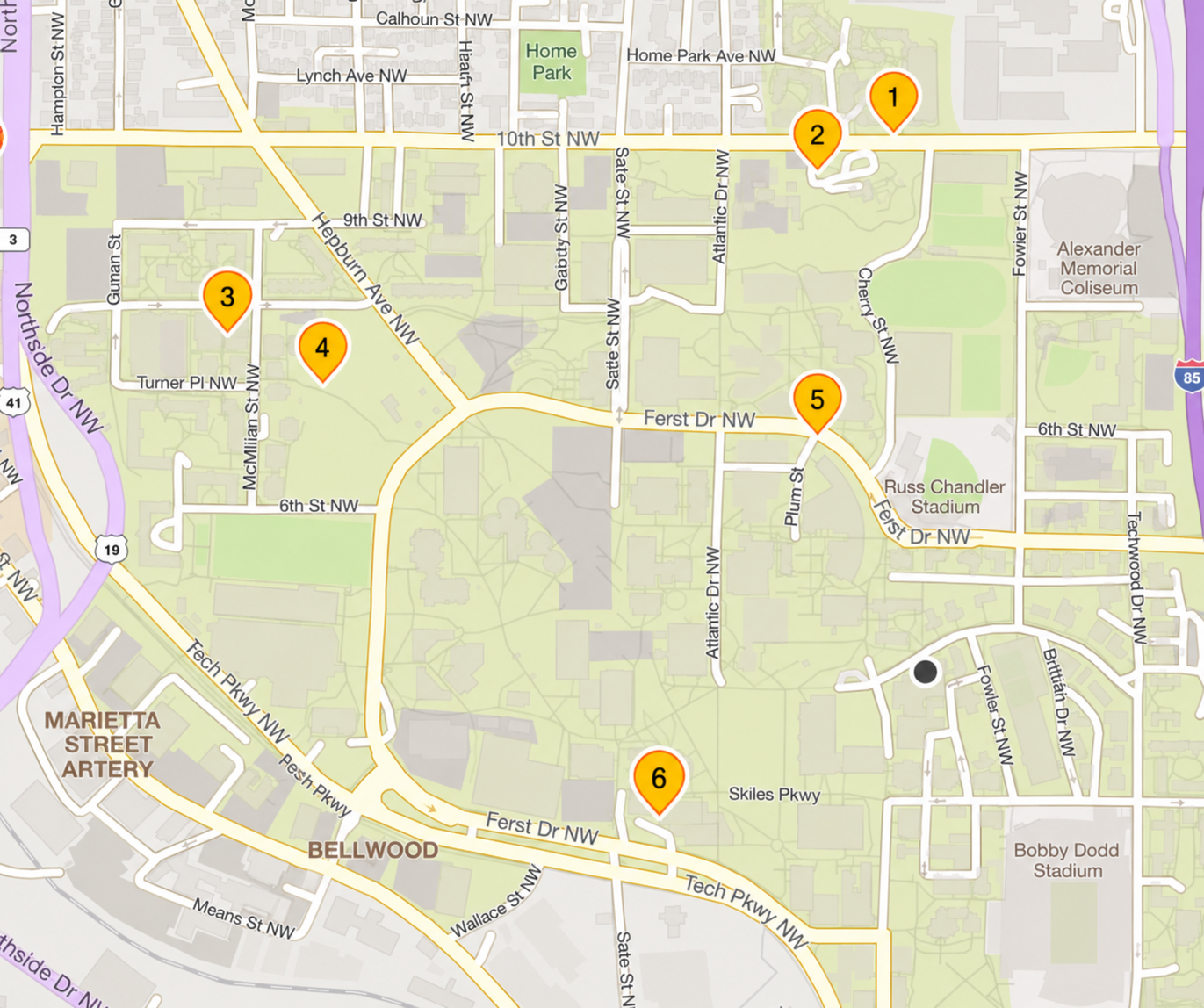
Amazon Locker - Suite
Family Housing at Tenth and Home, Building B 251 10th Street, NW Atlanta, GA 30318
Amazon Locker - Len
Graduate Living Center 301 10th St NW Atlanta, GA
Amazon Locker - Dilophosaurus
West Village Commons 532 Eighth St NW Atlanta, GA
Amazon Locker - Fulmer
Fulmer Residence Hall 871 McMillan St NW Atlanta, GA
Amazon Locker - Daksh
Ford Environmental Science & Technology Building 311 Ferst Dr. NW Atlanta, GA 30332
Amazon Locker - Bubbly
John Lewis Student Center 351 Ferst Drive NW Atlanta, GA
Map markers are approximate. Please use the addresses listed to find the precise location of each locker.
Location Markers
Family Housing at Tenth and Home, Building B251 10th Street, NWAtlanta, GA 30318
Graduate Living Center301 10th St NWAtlanta, GA
West Village Commons532 Eighth St NWAtlanta, GA
Fulmer Residence Hall871 McMillan St NWAtlanta, GA
Ford Environmental Science & Technology Building311 Ferst Dr. NWAtlanta, GA 30332
John Lewis Student Center351 Ferst Drive NWAtlanta, GA
*Be sure to pick the correct locker name when checking out.
Using the Amazon App
Add Your Locker
- Open your Amazon app
- Open Account Settings and navigate to “Your Addresses”
- Tap “Add new pickup location”
- Enter the GT zip code: 30332
- Choose one of our six on-campus lockers
- Add locker to your address book
Check Out
- In your cart, click proceed to checkout
- Select the locker as your delivery address
- When you package is ready for pickup, you’ll receive an email/push notification
- Generate the 6-digit pickup code or barcode in the app
- Enter the 6-digit code or scan barcode at locker to pick up your package
Using the Amazon Website
Add Your Locker
- Log in to Amazon.com
- Hover over “Account and lists”
- Click on “Account”, then “Your Addresses”
- Select “Add Address”
- Click “Or find an Amazon pickup location near you”
- Enter the GT zip code: 30332
- Choose one of our six on-campus lockers
- Click ‘Add to address book”
Check Out
- In your cart, click proceed to checkout
- Under ‘Select a delivery address”, choose your selected locker under “Pickup locations”
- When you package is ready for pickup, you’ll receive an email notification
- Generate the 6-digit pickup code or barcode from the email
- Enter the 6-digit code or scan barcode at locker to pick up your package